0292 5135235 kec_tegowanu@grobogan.go.id

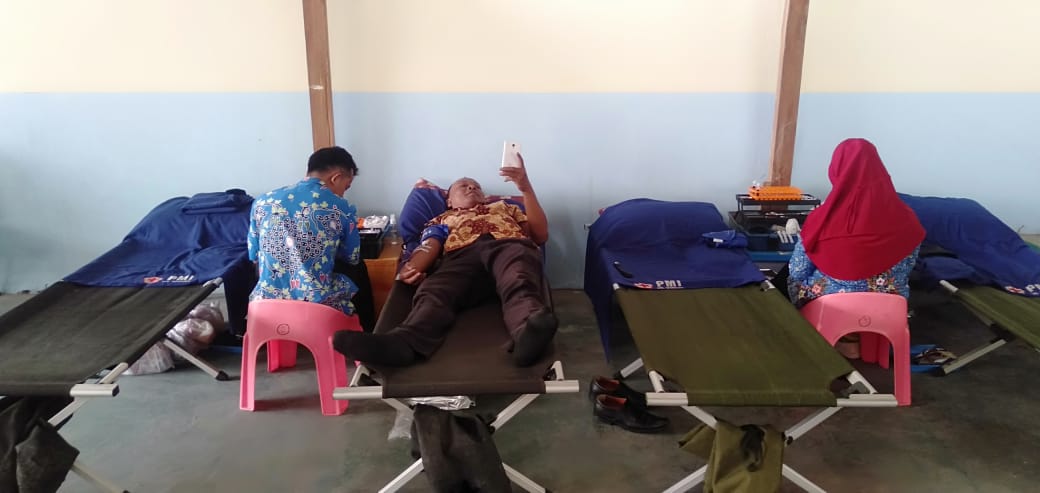
Kegiatan Donor Darah di Kantor Kecamatan Tegowanu Dilaksanakan Rutin Setiap 6 Bulan Sekali

Salah satu kegiatan rutin di Kantor Kecamatan Tegowanu adalah Donor Darah, yang di laksanakan setiap enam bulan sekali. Periode kedua ditahun 2019 dilaksanakan pada hari Kamis tanggal 21 November 2019. Petugas Palang Merah Indonesia dari Kabupaten Grobogan tiba di Kantor Kecamatan Tegowanu pukul 09.00 WIB. Beberapa karyawan kantor Kecamatan Tegowanu meluangkan waktunya untuk mendonorkan darah di sela-sala waktu pelayanan. 

Desa Mangunsari Raih peringkat terbaik lomba phbs tingkat kab.grobogan

IMG 20190723 WA0008

Desa Mangunsari raih predikat terbaik desa berprilaku hidup bersih dan sehat tk kab grobogan tahun 2019

hal ini menjadi tanda adanya semangat bersama membangun desa sehat

keberhasilan ini diperoleh adanya gorong royong warga dikomando Pak kades dan didampingi kecamatan TP PKK Puskesmas dll

Working on Your Site

Here are some basic tips for working on your site.

  • Joomla! has a "front end" that you are looking at now and an "administrator" or "back end" which is where you do the more advanced work of creating your site such as setting up the menus and deciding what modules to show. You need to login to the administrator separately using the same user name and password that you used to login to this part of the site.
  • One of the first things you will probably want to do is change the site title and tag line and to add a logo. To do this click on the Template Settings link in the top menu. To change your site description, browser title, default email and other items, click Site Settings. More advanced configuration options are available in the administrator.
  • To totally change the look of your site you will probably want to install a new template. In the Extensions menu click on Extensions Manager and then go to the Install tab. There are many free and commercial templates available for Joomla.
  • As you have already seen, you can control who can see different parts of you site. When you work with modules, articles or weblinks setting the Access level to Registered will mean that only logged in users can see them
  • When you create a new article or other kind of content you also can save it as Published or Unpublished. If it is Unpublished site visitors will not be able to see it but you will.
  • You can learn much more about working with Joomla from the Joomla documentation site and get help from other users at the Joomla forums. In the administrator there are help buttons on every page that provide detailed information about the functions on that page.

About

This tells you a bit about this blog and the person who writes it.

When you are logged in you will be able to edit this page by clicking on the edit icon.